 By Ande Jacobson
For close to 30 years or so, I’ve been a faithful TurboTax user. Prior to that I still did my own taxes, but I did them the really old fashioned way – i.e., I got my forms from the library, wrote everything by hand and mailed them in. Although TurboTax has been around since 1984, I finally got around to trying it in the late 1990s. The software made filing my taxes easy and was initially pretty inexpensive. As time went on the software evolved to a very robust package. Also over time, it got more expensive, especially after Intuit segregated which forms were available through the interview in each version. The more complicated the return, the more expensive the package became. The H&R Block software, TaxCut, is much the same thing, although since I was in the TurboTax realm I never explored that one. Still, I’ve been considering looking for a less expensive option for some time. We have to file our taxes, but we shouldn’t have to pay an exorbitant fee to do so if we choose to do them ourselves.
In 2024, the IRS made a new software package available for free – IRS Direct File. Users who were eligible could use this online service to fill out their return and e-file through an interview process similar to the major commercial software packages but without any fees for their federal return. They were then passed to their state’s filing system to do their state return. This service wasn’t, and still isn’t available in all states though, as currently only 25 states have it. For those that do, only those filing very simple returns are eligible. If the filer has income reported on forms beyond W-2s 1099-G, 1099-SA, SSA-1099, or a 1099-INT (with a pretty low limit), they are not eligible to use this service. There is also an income cap for filers with only these types of income.
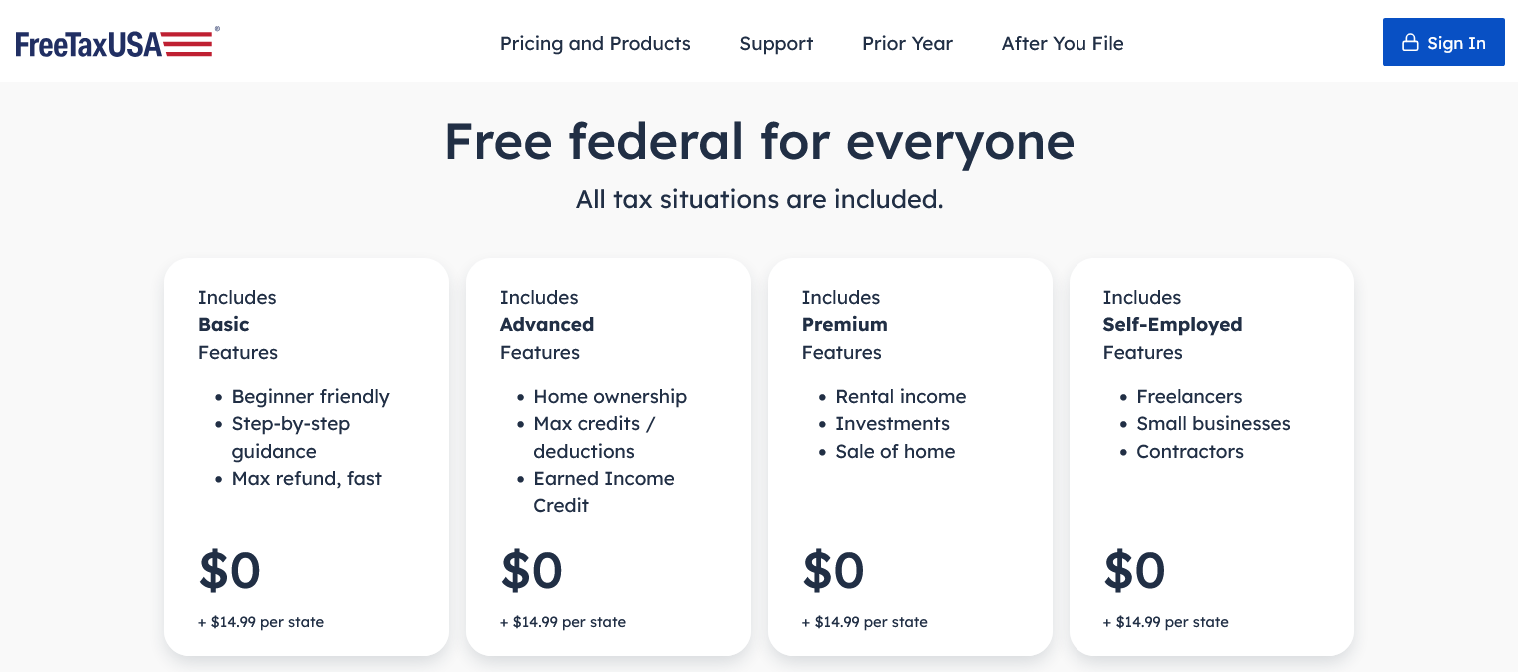 There is a much cheaper, slick option even for more complex returns. FreeTaxUSA is a software package that a DIY filer would love. It has most of the bells and whistles that the more expensive commercial software packages have, it makes filing easy, and is completely free for filing federal tax returns. If a filer needs to file a state return, they can use this package for only $14.99 as opposed to paying TurboTax’s $25 to file a state return in addition to the cost of the TurboTax software which practically starts at $50 and goes up to $130 depending on the complexity of one’s return. FreeTaxUSA avoids that software package fee. There are additional services that one can buy such as audit defense or phone help which are about the same price with either TurboTax or FreeTaxUSA, but they aren’t necessary for the those who are comfortable doing their own taxes and have options for handling any potential audit themselves. Also, both TurboTax and FreeTaxUSA offer online support through chat or by accessing their knowledge bases. One common FreeTaxUSA add-on is the unlimited amended returns option for those who are likely to get corrected 1099s or other forms. That’s an additional $7.99 (which also includes priority chat help), bringing the total for everything up to $22.98 which still beats TurboTax. Without the unlimited amended returns option, an amended return is a little more expensive.
 So what’s different between FreeTaxUSA and TurboTax? A few things, but they are very manageable, and considering the price differential, they are worth the little bit of extra effort.
TurboTax allows users to download their tax forms into the software directly from many, but not all financial institutions. FreeTaxUSA doesn’t have that capability, so users have to enter the information on their forms into the system. Still, since that data needs to be verified even if it’s downloaded, it’s not that big a deal to just enter the data directly. Also, for things like 1099-Bs (brokerage sales), a user can enter summary information rather each individual transaction, so it’s is pretty quick. From that summary information, the software will generate the appropriate Schedule D.
TurboTax allows users to jump around and complete sections out of order. For instance a user could enter their deductions before they enter their income if they like. FreeTaxUSA requires users to go in order initially to open up each section. Once they’ve gone through all the pieces in order one time though, they can then jump around to any section that needs more data or corrections just like with TurboTax. I initially found this annoying, but I realized that I didn’t need to enter all my income in before I could enter my deductions. I just had to click through the sections to open them up, so it wasn’t too bad.
TurboTax allows users to flip between the interview view and the forms view. FreeTaxUSA doesn’t allow users to directly input the data in the forms or readily flip views the way that TurboTax does, but they do make applicable forms and worksheets available to review once they are applied. Both also allow users to download and review a copy of what’s being filed along with the worksheets, but if a user wants to look at all of the applicable worksheets in FreeTaxUSA, they have to download them separately one at a time though the filing package is integrated.
TurboTax allows user to create up to five federal returns with a single package and numerous state returns for each federal return as applicable. FreeTaxUSA is a single use package per userid. If a user needs to file multiple federal returns (outside of amended returns for that user), they’ll need to create multiple userids/accounts to do so.
While FreeTaxUSA isn’t quite as robust as the full TurboTax package, it offers users a much more economical way to file their taxes securely through a friendly software package that makes filing easy. I even had an occasion to ask about an unusual situation with a hypothetical future return based on some changes happening in 2025, and I got timely, correct information on how to handle that situation.
All things considered, for somebody who is used to using any of the various commercial tax software packages, switching to FreeTaxUSA is a worthwhile endeavor that will save them time and money. Also, for future returns, FreeTaxUSA saves the returns in the user’s account and pre-populates the applicable areas of the return which saves time down the line.
References:
https://www.freetaxusa.com/
https://directfile.irs.gov/
https://turbotax.intuit.com/

 A Good Reed Review